



Last Updated: May 11, 2026
Telegram Downloader Summary
Best for: Downloading public Telegram videos and media from direct t.me links.
- Works without Telegram login
- Supports public post/message links
- Mobile and desktop friendly flow
What Can You Download with GetInSaver Telegram Downloader?
Telegram has evolved into much more than just a messaging app; it is now a massive repository for high-quality media, educational courses, and viral video content. However, accessing this media often requires keeping the Telegram app open and using up significant device memory for caching. GetInSaver Telegram Downloader provides a streamlined way to save this content directly to your browser.
1. Telegram Public Channel Videos: Many channels on Telegram share exclusive video content, documentaries, and news clips. If the channel is public (meaning it has a t.me link that anyone can view), GetInSaver can process that link and provide you with a direct download button. This is ideal for archiving content without cluttering your chat list.
2. Large Media Files and Documents: One of Telegram's best features is its support for very large files (up to 2GB). While our web-based tool is optimized for standard media, it can handle a variety of file types shared in public links, helping you move data from the cloud to your local storage with ease.
3. High-Quality Images and Infographics: Telegram is a favorite for designers and photographers because it doesn't always compress images as heavily as other platforms. GetInSaver allows you to save these high-fidelity visual assets in their original form, ensuring you get the full color depth and resolution intended by the uploader.
4. Secure Link Processing: We focus on public 't.me' and 'telegram.me' status links. Our system is built to parse the unique structure of Telegram's web previews, ensuring that we can identify the media even when it is embedded within a complex post or announcement.
Why GetInSaver is the Best Tool for Telegram Media?
Telegram is built with privacy and speed at its core, and your downloader should follow those same principles. GetInSaver is the perfect companion for the power Telegram user who values efficiency and security.
Privacy-First Architecture: Telegram users are traditionally very security-conscious. We respect that. GetInSaver does not require you to link your Telegram account, enter your phone number, or provide any login sessions. We act as a neutral third party that simply fetches the public media on your behalf. Your personal Telegram data remains 100% safe and untouched.
No App Required: Sometimes you want to save a video from a Telegram link you found on a forum or social media, but you don't have the Telegram app installed on your current device. GetInSaver allows you to download that media directly through your browser. This makes us the most flexible solution for saving t.me media on public computers or secondary devices.
Robust and Stable Downloads: Telegram's data centers are spread across the globe. We use a high-performance network that maintains stable connections to these servers, ensuring that your downloads don't fail midway through. This is particularly important for longer videos where a dropped connection could mean starting over. GetInSaver handles the heavy lifting, providing a smooth and reliable data flow.
Clean and Professional Service: Unlike many Telegram "bots" that are often buggy or full of spam, GetInSaver is a professional web application. Our interface is clear, our buttons are easy to find, and our service is consistent. We provide a "Web-to-Local" bridge that feels integrated and premium, without any of the risks associated with unverified third-party bots.
Pro Tips for Telegram Media Archiving
Telegram's ecosystem is vast. These tips will help you navigate the platform's link structure and use GetInSaver to its full potential for your media archiving needs.
Identify Public Links: Our tool works exclusively with public channel links. You can identify these because they usually follow the format `t.me/channel_name/123`. If a link requires you to "Join Request" the group, our tool will not be able to access the media for security reasons. Stick to public-facing channels for the best results.
How to Get a Message Link: On the Telegram mobile app, you can right-click (or long-press) on a specific message in a public channel and select 'Copy Link'. This direct link to the message is exactly what you need to paste into GetInSaver. For desktop users, simply right-click the message and choose 'Copy Post Link'.
Organizing Large Downloads: If you are downloading a series of educational videos or a movie from a channel, we recommend renaming the files after they download. Telegram often uses generic filenames like "video_2023.mp4". Keeping your local folders organized will save you a lot of time later.
Dealing with "File Not Found": If GetInSaver says it can't find the media, check if the channel has been set to private or if the specific post has been deleted. Also, ensure that the "Web Preview" is enabled for that post in Telegram, as this is often how our system identifies the media assets.
Telegram Format Compatibility & Quality Standards
We know that Telegram users often deal with specialized file types. We've optimized our system to handle the most common formats while ensuring they stay compatible with your local players.
Video Standards: Most Telegram videos are saved as MP4 or MKV. Our tool identifies the best source and provides it to you. We support resolutions up to 1080p and beyond, depending on the original source file provided by the channel admin.
Image Standards: We support JPEG, PNG, and the newer WebP formats often used for Telegram stickers or lightweight channel images. You'll always get the highest resolution possible.
Audio Quality: Audio files are generally provided as high-bitrate MP3s, ensuring that music or voice memos are crystal clear.
By using standard H.264 encoding for most video results, we guarantee that you can play your saved Telegram content on any player, from VLC on your PC to the native video app on your smartphone.
Related Free Social Media Downloaders
Frequently Asked Questions – Telegram Downloader
How do I download a Telegram video from a t.me link?
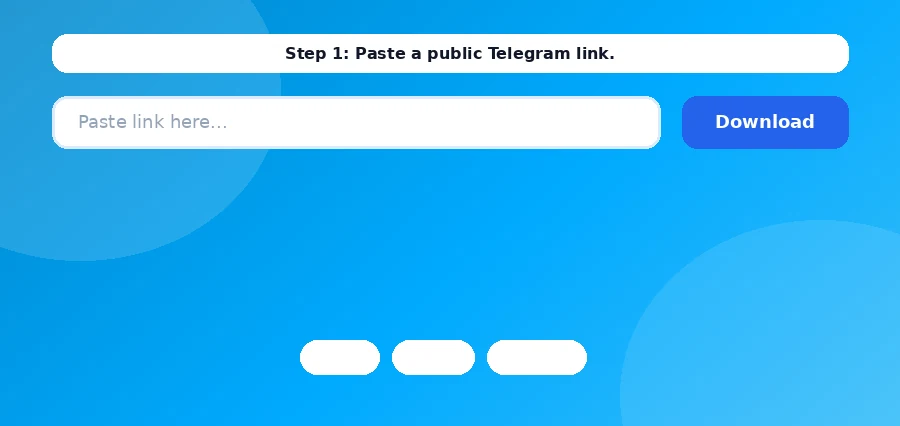
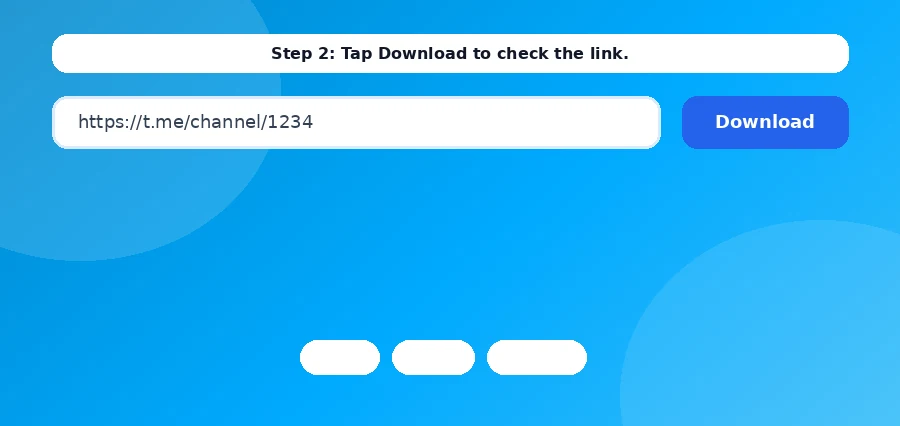
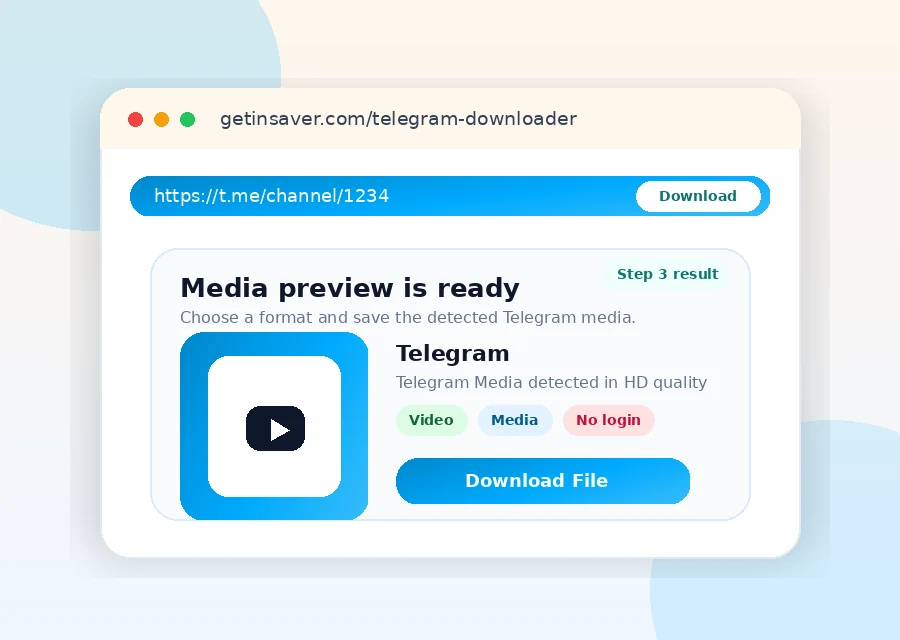
Copy the public post link (for example: t.me/channel_name/123), paste it in the downloader box, and click Download.
Why does my Telegram link show "private or unavailable"?
This usually means private channel visibility, deleted post, or no public preview access.
Can I download protected Telegram content?
No. GetInSaver does not bypass source protection or private access controls.
What formats are supported for Telegram downloads?
Videos are commonly MP4; images may be JPG/PNG/WebP depending on source output.
Is there any file size limit?
No fixed per-user quota is enforced. Very large files may take longer based on source/network conditions.
Is GetInSaver safer than unknown bots/apps?
GetInSaver is browser-based and does not ask for Telegram login or phone number.
Can I use this Telegram downloader on iPhone and Android?
Yes. It works in modern mobile and desktop browsers.
Downloader Reliability Notes
For stable Telegram download results, always use the original public post URL and avoid shortened links when possible. If a file does not load on the first try, refresh once and submit the same link again after a few seconds. Source availability can change quickly when posts are edited, removed, or region-limited. GetInSaver is designed to process publicly accessible media only and does not bypass private access controls. For teams, the best workflow is to keep a shared list of verified links, downloaded filenames, and timestamps so nothing is lost. This simple process improves consistency, reduces retry time, and keeps your archive clean and traceable across desktop and mobile devices.
If you run repetitive downloads every day, create a practical checklist: validate URL format, confirm source visibility, retry once on transient failure, and store output with a predictable naming scheme. A consistent checklist eliminates random results and makes troubleshooting much faster. For content teams, this matters because delayed retrieval can break publishing schedules. You should also keep platform-specific folders and a weekly cleanup routine to avoid duplicate files and stale assets. On mobile devices, prioritize stable networks before downloading large media and ensure enough free storage is available. On desktop, batch your review process: validate links first, then execute downloads, then quality-check all outputs in one pass. This structure saves time and reduces human error. GetInSaver works best when used as part of a repeatable workflow rather than ad-hoc one-off actions. The goal is not only successful downloads, but reliable operations you can scale safely.
Another recommendation is to document source context for each downloaded file: original URL, capture date, and intended use case. This simple metadata discipline helps future audits, improves searchability inside your archive, and prevents accidental misuse of outdated or removed content. If a platform updates delivery behavior, your historical notes help isolate change impact quickly. For high-volume users, maintain a small quality rubric for every file: playable status, resolution expectation, audio sync, and duplicate check. With this method, your archive remains usable over time instead of becoming a large unstructured folder. GetInSaver is optimized for practical execution, and these operational habits maximize that advantage across Pinterest, X/Twitter, Telegram, and story-driven workflows.