GetInSaver – Download Videos from Instagram, TikTok & Telegram
Paste a link from a public post and save the video, photo or audio to your phone or computer. One box for Instagram, TikTok, X, Telegram and 8 more sites. Free, no sign-up.
Works with links from these sites:
- Free
- No sign-up
- Phone & computer
- Public posts only

Supported Platforms & Content Types
Every site has its own page with the links that work, tips and answers. The box above takes links from all of them.
-
Instagram Downloader
Reels, videos, photos and carousels from public posts MP4 · JPG -
Instagram Reels Downloader
Any public Reel as an MP4 with its sound MP4 -
Instagram Story Downloader
Up to 30 current Stories from a public account MP4 · JPG -
Instagram Highlight Downloader
Highlights from public accounts, up to 12 items MP4 · JPG -
Instagram Photo Downloader
Post photos in the size Instagram serves JPG -
Instagram Carousel Downloader
Every slide of a public carousel, in order MP4 · JPG
Video, photo and audio sites
-
TikTok Downloader
Videos without the TikTok watermark, and photo posts MP4 · JPG -
Twitter / X Downloader
Videos, GIFs and photos from public posts MP4 · JPG -
Telegram Downloader
Videos, photos, music and files from public channels, up to 2 GB MP4 · MP3 · PDF -
Pinterest Downloader
Video Pins and images in their original size MP4 · JPG -
Facebook Video Downloader
Videos and Reels from public pages and posts MP4 -
Threads Video Downloader
Videos, photos and carousels from public posts MP4 · JPG -
Reddit Video Downloader
Reddit videos with the sound joined in, up to 720p MP4 -
LinkedIn Video Downloader
Videos from public posts MP4 -
Vimeo Video Downloader
Public videos, and unlisted ones without a password MP4 -
Dailymotion Video Downloader
Public videos up to 720p MP4 -
SoundCloud Downloader
Public tracks in the format SoundCloud streams M4A · MP3 -
Image Downloader
A picture from its direct .jpg, .png, .webp or .gif address JPG · PNG · WebP · GIF
How to download videos from Instagram, TikTok and more
-
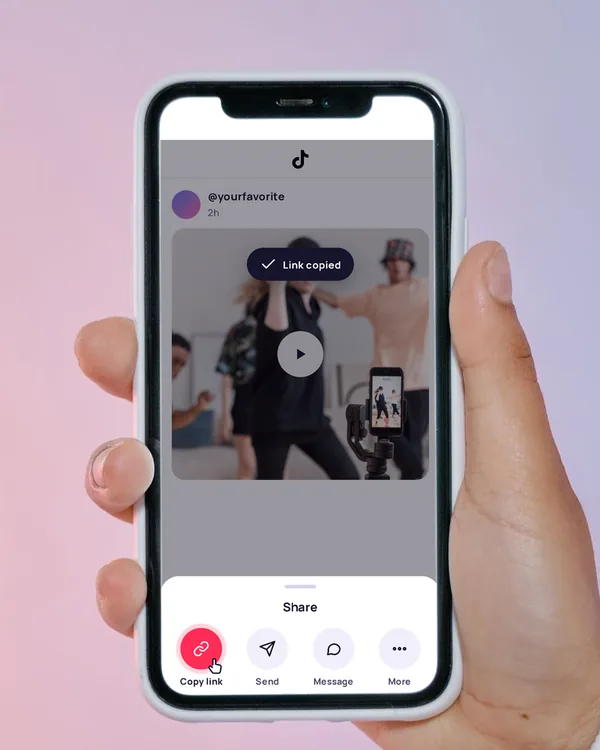
Copy the link
In the app, tap Share, then Copy link. On a computer, copy the address from the browser bar.
-
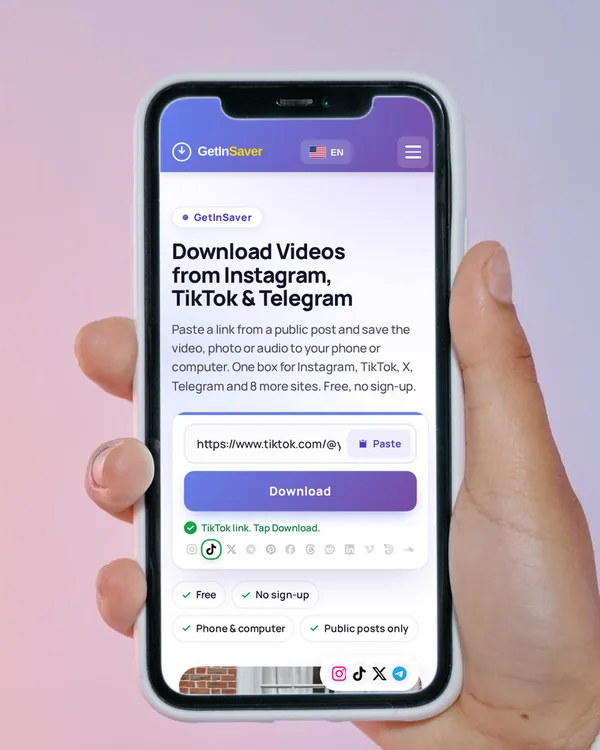
Paste it here
Tap Paste above, or press and hold the box and paste. We show which site the link is from, and the download starts on its own.
-
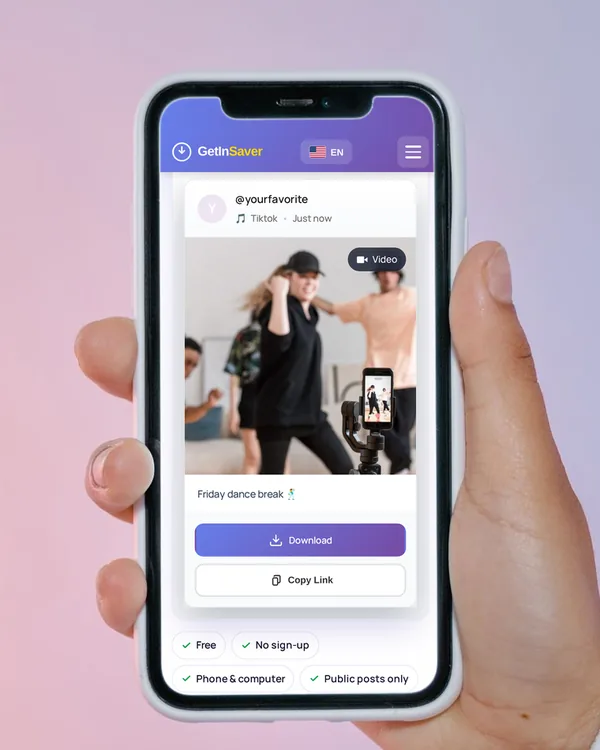
Save the file
Tap Download. Most videos save as MP4, photos as JPG or their original format, audio in the format the site streams.
In Safari, tap Download, then open Files › Downloads. Open a video and choose Save Video, or press and hold a photo and choose Save to Photos.
In Chrome, the file goes to the Downloads folder and shows up in your Gallery a moment later.
The file saves to your Downloads folder. Right-click › Save as if your browser asks where to put it.
Why people use GetInSaver
-
One box for 12 sites
Instagram, TikTok, X, Telegram, Pinterest, Facebook, Threads, Reddit, LinkedIn, Vimeo, Dailymotion and SoundCloud. We tell the site from the link.
-
No account, no password
You never sign in to Instagram, TikTok or Telegram here, and we never ask for your password.
-
The best version, picked for you
We take the best version the post offers, so there is no quality menu to puzzle over.
-
No watermark from us
We never stamp our logo on your files, and TikTok videos come without the TikTok watermark.
-
Works in your browser
Safari on iPhone, Chrome on Android, and any modern browser on Windows or Mac. No extension to install.
-
Free for everyday use
No sign-up and no payment for the downloads people normally need. For very large volumes there is a developer API.
See the developer API
Instagram and TikTok downloader in one place
Paste the link of a Reel, a post or a carousel to save its videos and photos. Paste a profile link to see the account’s current Stories, or a highlight link to save that highlight. Only public accounts work.
Open the Instagram downloaderTikTok
Paste a video link from the Share menu. The video saves as an MP4 without the TikTok logo and username on it, and photo posts save as separate pictures. Short vm.tiktok.com links work too.
Open the TikTok downloaderTelegram
Paste the link of a post in a public channel. Videos, photos, music and files up to 2 GB stream straight to your device. You never sign in to Telegram.
Open the Telegram downloaderAt a glance
- Price
- Free, no sign-up
- Sites
- 12 sites, plus direct image links
- Formats
- MP4 video, JPG, PNG, WebP and GIF pictures, M4A or MP3 audio, Telegram files as sent
- Devices
- iPhone, Android, Windows and Mac, in the browser
- Works with
- Public posts only
What GetInSaver can’t download
- Private accounts, friends-only posts and Close Friends stories
- Deleted posts and Stories older than 24 hours
- Telegram channels whose owner turned off saving, and private groups
- Paid or subscriber-only videos
- YouTube and other sites that are not in the list above
Frequently asked questions
Is GetInSaver free?
Yes. You can download public videos, photos and audio as often as you normally need without paying or signing up. For very large volumes we have a developer API.
Which sites does GetInSaver support?
Instagram (Reels, posts, photos, carousels, Stories and Highlights), TikTok, X (Twitter), Telegram, Pinterest, Facebook, Threads, Reddit, LinkedIn, Vimeo, Dailymotion and SoundCloud, plus direct links to .jpg, .png, .webp and .gif pictures.
Do I need to install an app or sign in?
No. GetInSaver works in the browser on iPhone, Android and computers. You never sign in to Instagram, TikTok or any other site here.
Will the person know I downloaded their post?
No. The file is fetched by our server, and these sites don’t notify the person who posted it.
Can I download from private accounts?
No. Only public posts work. Private accounts, friends-only posts and Close Friends stories can’t be reached.
What quality and format will I get?
The best version the post offers; we pick it for you. Videos save as MP4, photos as JPG or their original format, and SoundCloud audio as M4A or MP3.
Can I download TikTok videos without the watermark?
Yes. TikTok videos save as an MP4 without the TikTok logo and username stamped on them.
Can I download Instagram Stories and Highlights?
Yes, from public accounts. Paste a profile link to get up to 30 current Stories, or a highlight link to get up to 12 items from that highlight.
Can I save only the sound as an MP3?
No. We don’t turn videos into MP3. Audio comes from SoundCloud tracks and Telegram music files, in the format they were shared.
Why does a download fail?
Usually the post is private or deleted, or the link was cut short. Copy the link again from the Share menu and try once more. Each site’s page lists the messages you may see and what to do.
Download only what you have the right to keep, and credit the creator when you share.